Home Finances · Pro

Save with purpose - set goals

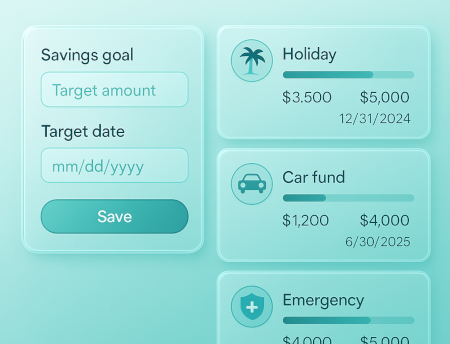
Create savings goals (holiday, car fund, emergency) with target amounts and target dates. Update contributions and celebrate milestones along the way.

Reviewed by GoTaskhub Team · Last updated 21 Oct 2025
Target amount & dateTrack contributionsMilestones & timelineMultiple goals
Savings goals interface showing multiple goals, target amounts, dates and progress bars

Highlights

A quick snapshot of what you can do.

Targets that stay clear

Define what you’re saving for, how much, and by when - then follow a simple plan.

Progress that updates instantly

Every contribution moves the bar. Quick visibility makes saving feel achievable.

Timelines and milestones

Stay motivated with checkpoints and realistic pacing.

Multiple goals, one place

Run several goals side-by-side and prioritise as life changes.

Works with Expenses

Track spending patterns and choose deposit amounts that fit reality.

Improves with Analytics

Use trends to adjust targets and deposits month-to-month.

How it works

Simple steps to get powerful results.

1
1

Create a goal

Name your goal (e.g., Holiday 2026), choose a category, then set a target amount and date. Smaller, near-term goals build confidence and momentum that carry into bigger targets later.

2
2

Add contributions

Record deposits as they happen or batch them weekly. Each contribution updates your progress instantly, and short notes make it easy to recall where the money came from.

3
3

Celebrate milestones

Mark 25%, 50% and 75% milestones. Quick wins keep motivation high and make your plan resilient during busier months when deposits are smaller.

4
4

Review & refine

Check progress every week. If priorities shift-new commute, medical costs-tweak the amount or date. Your history remains intact for honest month-over-month comparisons.

Key Benefits

What you get out of this feature - fast.

Define clear targets

Every strong savings plan starts with clarity. For each goal, set a target amount and a realistic target date. Keep the scope narrow-“Emergency fund €1,500 by June” beats “Save more someday.” Clear boundaries help you track momentum, adjust expectations early, and celebrate progress when the bar hits key milestones.

  • Target amount + realistic target date
  • Narrow scope for better follow-through
  • Celebrate progress at key milestones

Track contributions

Log deposits whenever you move money into savings. Each entry updates your progress bar and keeps a tidy history for audits or partner check-ins. Notes add context-“tax refund” or “sold bike”-which is useful when reviewing what actually moved the needle this month.

  • Progress updates instantly
  • Keep a clean contribution history
  • Notes add context for reviews

Run multiple goals

Life rarely has a single target. Track several goals side by side-holiday, car fund, emergency buffer-then prioritise or pause as circumstances change. Because history stays intact, you can adapt without losing the story of how you got here.

  • Multiple goals side-by-side
  • Pause or reprioritise without losing history
  • Stay flexible as life changes

Real examples of savings goals

Common goals our users create:

Emergency Fund

  • €1,500 by June
  • Weekly €75 deposit
  • Interest as separate contribution

Holiday 2026

  • €2,000 by March 2026
  • Monthly €150 deposit
  • Milestones every €500

Car Fund

  • €3,500 by December
  • Side-hustle income only
  • Pause during school holidays

Home Repairs

  • €1,000 rolling
  • Top up when under €400
  • Label invoices in notes

New Laptop

  • €1,200 by Black Friday
  • Round-up deposits
  • Track accessory costs separately

Education

  • €2,400 per year
  • Quarterly €600
  • Scholarship credits as contributions

Who this works best for

Busy families

Turn irregular expenses-holidays, school trips, repairs-into planned goals with steady contributions.

Solo households

Build an emergency buffer and fund big purchases without derailing the monthly budget.

Side-hustlers

Allocate a portion of freelance income toward tax, equipment and training goals with clear timelines.

GoTaskhub Goals vs spreadsheets

FeatureGoTaskhub Home GoalsSpreadsheets
Progress trackingAutomatic with each contributionManual formulas & charts
Multiple goalsSide-by-side with timelinesTabs and templates to maintain
MilestonesVisual checkpoints built-inDIY rules or conditional formats
CSV portabilityClean import/exportProne to column drift over time
Works with budgetsIntegrated with monthly planSeparate sheets to reconcile

Pros & cons of GoTaskhub Goals

Pros

  • Clear targets with visual progress
  • Multiple goals with timelines and milestones
  • CSV import/export keeps data portable
  • Works alongside Budgets, Expenses, Analytics

Cons

  • Requires short, regular check-ins for best results
  • Advanced analytics available with Pro

Security & privacy

Permissions

Invite a partner with view or edit access. Each workspace is permissioned so your household stays in control.

Data ownership & backups

Export goals and contributions to CSV anytime for backups or analysis. No lock-in-your savings history is yours.

Glossary

Target amount
The total you aim to save for a goal.
Target date
The date you want to reach your goal by.
Contribution
A deposit toward your goal (including interest credits).
Milestone
A checkpoint (e.g., 50%) used to celebrate progress and stay motivated.

Related features

Frequently asked questions

Quick answers to common questions.

Q.What are Home Goals?
Goals let you set a target amount and target date for things like a holiday, car fund, or emergency savings-then track contributions and progress.
Q.Can I manage multiple goals?
Yes. Create as many goals as you need. Each goal shows its own progress bar, target, and timeline.
Q.How do I track contributions?
Add contributions whenever you deposit money toward a goal. Your progress updates automatically and milestones are celebrated.
Q.Is this included in the free plan?
Home Finances (including Home Goals) is part of GoTaskhub Pro. Start free and upgrade anytime.
Q.Can I share a savings goal with my partner?
Yes. Invite them to your workspace with view or edit permissions. Both of you can add contributions and see progress in real time.
Q.Do you support multiple currencies for goals?
Pick a primary currency for summaries. If your deposit is in another currency, add a note with the original amount-then record the equivalent value in your primary currency for clean analytics.
Q.Can I create sub-goals or milestones (e.g., 25%, 50%, 75%)?
You can add milestones as notes with dates and amounts. In practice, most households set quarterly or percentage milestones and celebrate when they’re reached.
Q.Can I import goal contributions from a CSV?
Yes. If you keep records in a spreadsheet, import a CSV and map date, amount, and note fields to backfill your progress.
Q.Do you calculate interest on savings goals?
You can record interest as a contribution (note: “interest credit”). This keeps your progress accurate while letting your bank handle interest calculations.
Q.Can I set recurring transfers toward a goal?
You can log recurring contributions manually as part of your weekly routine and use notes to indicate the source. Consistent, small deposits typically beat irregular lump sums.

Start your first savings goal

Try GoTaskhub free. Upgrade to Pro for the full Home Finances suite.

Ready to streamline your business?

Join thousands of trade professionals who are saving time and winning more work.

No credit card required.

GoTaskhub logo

The smart HQ for your entire business. GoTaskhub connects your quotes, invoices, customers, jobs, tasks, calendar, expenses, budgets, analytics, and even your home finances - all in one clean, automated system.

Built for trades, service pros, freelancers, and content creators who want to save time, get organised, and run a more profitable business.

© 2026 GoTaskhub.
Built for trades, service businesses & content creators.

Cookies & analytics

We use necessary cookies to make GoTaskhub work, and optional analytics cookies to understand how the site is used so we can improve it. You can change your choice at any time.

Necessary cookies

Always on – required for things like security and basic functionality.