How to quote a price for a job (step-by-step)
A good quote is a mix of accurate numbers and clear scope. Use this process to avoid underquoting, reduce disputes, and get approvals faster.
- Define scope: what’s included, excluded, and assumptions.
- List materials: include delivery, waste, and price-change buffer.
- Estimate labour: include travel, setup, cleanup, and admin time.
- Add overhead: van, tools, insurance, software, accountant, marketing.
- Add profit margin: planned buffer + reinvestment (not “what’s left”).
- Write the terms: validity, start window, deposit, change control.
- Send professionally: itemised, easy to approve, easy to follow up.
To standardise this, use quote templates that protect your margin and track job costs with expenses linked to customers/jobs so you can price with real numbers.
Then send a secure approval link via the client portal and convert approved work into invoices you can track (so nothing gets lost in inbox threads).
What is a quote (estimate)?
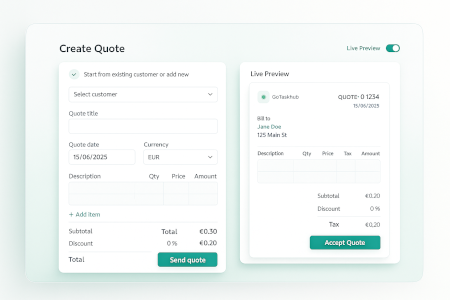
A quote (or estimate) is a formal price proposal you share before work begins. In GoTaskhub, quotes use line items with quantity, price, tax, and per-line or subtotal discounts so totals are clear and professional. Customers review a branded, mobile-friendly preview and approve via a secure link then you convert to an invoice in one click, preserving the full audit trail.
This matters because the quote is the “source of truth” for the whole job: it should flow into job scheduling and then into invoicing and payment tracking without re-typing.
Reduce friction
Client-friendly previews cut questions and back-and-forth.
Improve accuracy
Per-line taxes/discounts keep maths correct at any scale.
Speed to cash
Approvals route directly into invoicing and job scheduling.
Common use cases
- Service & repair: Parts and labour with per-line tax and discounts.
- Project proposals: Milestone-based quotes with staged deliverables.
- Maintenance contracts: Recurring line items with annual or monthly totals.
- Insurance/warranty jobs: Evidence-backed breakdowns that reduce disputes later.
- Field estimates: Create on site, attach photos, and get fast approval.
Once approved, keep the handoff clean by converting to invoices and scheduling delivery in jobs so everyone works from the same scope.
Templates, branding & consistency
High-converting quotes are consistent. Use templates with your logo, theme colours, and saved terms, and keep a library of common products/services. Your team starts from a known-good baseline and focuses on scope, not formatting. Because the preview is exactly what the client sees, you eliminate layout surprises and maintain a professional look.
Templates also prevent underquoting because you stop “forgetting” essentials (travel, disposal, admin time) when you’re busy. If you’re comparing tools, see pricing for plan options.
Template tips
- Pre-write intros and acceptance language
- Include warranty/valid-until text to set expectations
- Group line items by phase to aid comprehension
- Use per-line discounts for promotional items
Branding hygiene
- Upload a crisp logo (SVG/PNG) with transparent background
- Pick a theme colour with sufficient contrast
- Keep headings, fonts, and spacing consistent
- Use the same sign-off and contact block across teams
Pricing, discounts & tax the right way
GoTaskhub lets you control totals without spreadsheet fiddling. Add per-line taxes where needed, apply discounts per line or at the subtotal, and preview exact customer-facing math. This makes approval decisions faster and protects margin.
Want to tighten pricing accuracy? Track real costs with expense capture and categorisation so your future quotes are based on what jobs actually cost, not guesswork. And when you’re ready to bill, convert straight into invoices with payment status tracking.
Standard items
Quantity × Unit Price, with optional per-line tax.
Bundles
Use grouped items for kits/phases and subtotal messaging.
Discounts
Apply per-line or subtotal discounts; show the savings clearly.
Approvals, legal clarity & audit trail
Send quotes via secure link or email. Client approvals are timestamped, and you can attach photos/specs to remove ambiguity. Keep a clean history of edits, comments, and attachments so finance and ops can verify what was agreed without trawling inboxes.
This becomes even smoother when clients can view and approve inside your client portal, and your team can reference the same scope in jobs during delivery.
- Add valid until dates and acceptance text to reduce re-negotiation
- Attach terms or warranty PDFs for complex work
- Store everything with the record for compliance and handoffs
From quote → invoice → job without re-typing
Once a quote is approved, click Convert to Invoice to maintain continuity. Your line items, totals, attachments, and notes carry forward. Then schedule the work in Jobs, confident everyone’s working from the same details.
This is how you prevent “agreement drift”: the approved quote becomes the job plan, and the invoice reflects exactly what was agreed visible to the customer in the portal.
Invoices
Create the invoice from the approved quote instantly.
Jobs
Turn the win into a scheduled job with dates and assignees.
Client Portal
Let clients review quotes, approve, and track progress.
Industry-specific examples
HVAC / Trades
- Itemise inspection, parts, and labour; attach photos for clarity
- Per-line tax where required; subtotal discount for seasonal promo
- Valid-until dates to protect parts pricing
Creative / Agencies
- Discovery, design, copy, and revisions as separate items
- Milestone quotes; invoice each stage after approval
- Clarity on ownership, deadlines, and change control
Attachments & visual context
A picture can prevent scope creep. Add photos, drawings, specs, and compliance documents directly to the quote. Your customer and your technicians see the same detail. When the quote converts to an invoice or job, attachments stay linked.
This is especially useful when the same assets need to be visible in the job record and shared externally via the client portal.
Photos
Before/after, site shots, serial numbers (mobile-friendly).
Specs
Manufacturer PDFs, wiring diagrams, safety sheets.
Notes
Context and assumptions visible to all stakeholders.
Spreadsheets vs word processors vs GoTaskhub
Spreadsheets are flexible but error-prone and inconsistent across staff. Word processors look nice but require manual maths and re-typing later. GoTaskhub Quotes combines branded output with accurate, automated totals and one-click conversion to invoices no copy/paste, no duplicated data.
If you’re evaluating tools, compare plans on pricing or browse the features hub to see how quotes connect to the rest of your workflow.
Accuracy
Automatic totals, per-line taxes and discounts.
Speed
Templates, libraries, and one-click convert.
Professionalism
On-brand PDFs and client-friendly previews.
Performance & team workflows
Standardise approval SLAs, monitor conversion, and hand off seamlessly to finance and ops. Set up reminder cadences to nudge customers, and use templates to keep pricing consistent across estimators.
Over time, this shows up in better forecasting: track what’s being quoted vs what’s being won, then use analytics to spot trends and tighten pricing decisions.
Reminder rhythm
Automate polite nudges for unapproved quotes.
Conversion insight
Track created vs accepted quotes over time.
No re-typing
Approved quotes flow into invoicing and jobs.
Customer reviews
Quotes that look sharp, calculate correctly, and convert faster.

Rachel M.
★★★★★
We produce quotes 3× faster now. Line-level taxes and the live preview reduce errors and back-and-forth with customers.

Aaron K.
★★★★★
Love the one-click convert. Sales sends the quote link, gets approval, and our ops team bills instantly-no re-typing.

Priya S.
★★★★★
Templates plus discounts at the line or subtotal made our pricing consistent. We closed more deals and shaved admin time.