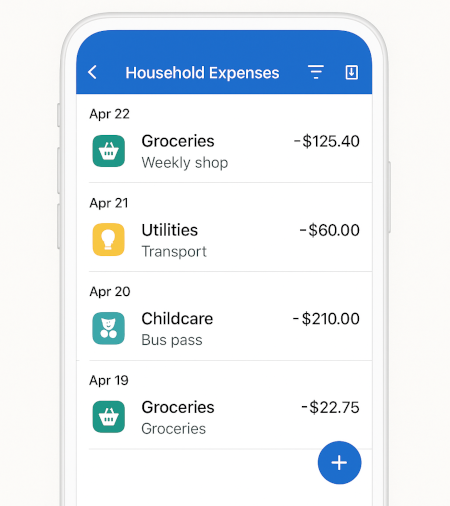
Tip: keep notes short but consistent
Notes like “Tesco”, “Fuel”, “Childcare”, or “Netflix” make search dramatically more useful. If you want deeper reporting later, consistent labels are the easiest win.
Real examples of household expenses
Common categories our users track every week:
Groceries
- Supermarket shop
- Local market
- Bulk items
Transport
- Fuel
- Public transport
- Parking
Utilities
- Electricity
- Gas
- Water
- Internet
Childcare
- After-school club
- Babysitting
- Nursery
Subscriptions
- Streaming
- Cloud storage
- Software
Home & Garden
- DIY supplies
- Plants & soil
- Small tools
Who this works best for
Busy families
Track groceries, childcare, transport and subscriptions in minutes. Share visibility without sharing bank logins.
Solo households
Stay on top of utilities and recurring bills. See month-to-month trends and cut silent drains.
Side-hustlers
Keep personal and business spending separate but visible in one workspace (with permissions).
GoTaskhub vs spreadsheets
| Feature | GoTaskhub Home Expenses | Spreadsheets |
|---|---|---|
| Fast entry on mobile | One-tap category, notes, receipts | Manual cells; easy to mis-tap |
| Built-in filters & search | Instant filters by category/date/keyword | Create filters every time |
| CSV export | One-click export anytime | Manual cleanup for columns |
| Budgets & goals (Pro) | Native budgets & savings goals | Formulas & maintenance required |
| Analytics | Automatic trends & breakdowns | DIY charts & pivots |
Pros & cons of tracking expenses in GoTaskhub
Pros
- Faster entry on mobile, with notes and filters
- Built-in budgets, goals and analytics (Pro)
- Export to CSV anytime (own your data)
Cons
- Manual logging if you don’t connect imports
- Advanced analytics require Pro
Security & privacy
Your household data stays yours. Export anytime to CSV for backups, or keep copies per month for peace of mind. Access is permissioned per workspace, so you can invite a partner with the right level of control-view-only or full edit. We follow least-privilege patterns in the app and make it easy to archive or delete entries. Notes and attachments are stored with your account, and you can remove them at any time.
We believe in portability: there’s no lock-in and no surprises when you want to analyze your own data elsewhere.
Glossary
- Fixed expense
- Recurring, consistent amount (e.g., rent).
- Variable expense
- Changes month to month (e.g., groceries).
- Category
- A label used to group expenses (Groceries, Utilities, Transport).
- CSV export
- A simple file format you can open in Excel/Sheets.
What users say

Rachel M.
London, UK
“We finally see where our money goes. The export + monthly roll-up is gold.”

Aaron D.
Dublin, IE
“Budgets finally stick. The category limits and progress bars stopped the overspending.”

Priya K.
Toronto, CA
“We actually finished our emergency fund-logging expenses + goals made it real.”