Home Finances · Pro

Household analytics - see the full picture

Understand where your money goes and how it changes over time. Monthly trends, category breakdowns, period comparisons, and clean exports that make planning simple.

Reviewed by GoTaskhub Team · Last updated 21 Oct 2025
Monthly trend linesCategory breakdownsCompare periodsCSV export
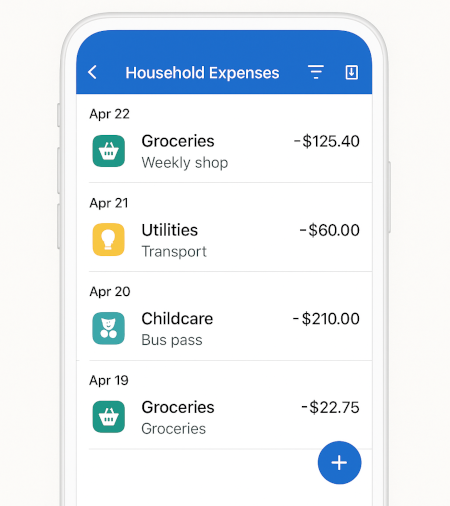
Household analytics dashboard showing trend lines, category breakdowns and comparisons

Highlights

A quick snapshot of what you can do.

Trends that show direction

Watch how spending changes month to month and spot anomalies early.

Category share & breakdowns

Understand where the money goes and what truly drives your spend.

Compare periods quickly

Measure one time range against another to prove progress and plan confidently.

Filters & drill-down

Use filters and search to understand the transactions behind any spike.

Clean exports

Export stable CSV data for deeper analysis and easy sharing.

Budget context

Pair analytics with budgets to turn insights into practical guardrails.

How it works

Simple steps to get powerful results.

1
1

Log expenses

Record purchases with category and short notes. A steady habit is more valuable than perfect data. Consistent entries unlock accurate charts and reliable comparisons.

2
2

Set budgets

Give each key category a monthly limit. As expenses roll in, Analytics shows where you’re pacing hot or cold, so you can redirect before the month gets away from you.

3
3

View analytics

Open the dashboard to see trend lines, category shares, and biggest movers. Drill-down lets you inspect the exact transactions behind any spike or dip.

4
4

Export or compare

Download CSV for spreadsheets or compare periods in-app-last month vs this month, or this year vs last-so you can see improvements in context.

Key Benefits

What you get out of this feature - fast.

Spot monthly trends

See how your spending changes across months and seasons. Trend lines highlight pace and direction-useful for planning school holidays, energy-heavy winters, or quieter months where you can save more. Because all charts are date-aware, you’ll quickly spot anomalies and act before small leaks become habits.

  • See seasonality and direction in seconds
  • Detect anomalies early before they become habits
  • Use date-aware charts for clean comparisons

Break down by category

Understand where the money actually goes. Category views surface top drivers-groceries, transport, subscriptions-so you can trim without sacrificing what matters. Custom categories carry through automatically, so your charts mirror your real life.

  • Surface your true top spend drivers
  • Custom categories carry through everywhere
  • Identify quick wins without guesswork

Export with one click

When you need deeper analysis or to share a snapshot, export a clean CSV. The structure is consistent month to month, which keeps pivot tables stable and makes audits painless. Own your data, no lock-in.

  • Clean CSV for pivots and audits
  • Stable columns month to month
  • No lock-in - your data stays portable

Real examples of insights

Common patterns households uncover in minutes:

Subscription creep
  • Identify unused apps
  • Cancel or downgrade
  • Reclaim €15–€40/month
Groceries pace
  • Mid-month overrun warnings
  • Adjust next shops
  • Switch to batch cooking
Transport spikes
  • Petrol surge vs last month
  • Carpool or plan routes
  • Track maintenance separately
Utilities seasonality
  • Heating vs summer baseline
  • Budget winter properly
  • Reduce bill anxiety
Cash withdrawals
  • Separate from card spend
  • Spot untracked cash usage
  • Add quick notes for context
Weekend vs weekday
  • Higher dine-out on weekends
  • Set a cap
  • Shift one meal to home cooking

Who this works best for

Busy families
Monitor categories that swing with the calendar-childcare, holidays, utilities-and spot early overspend before it snowballs.
Solo households
Keep a steady baseline and tighten where it counts. Use comparisons to confirm progress month by month.
Side-hustlers
Separate work-related costs from home spend, track trends, and prepare clean CSV exports for tax season.

GoTaskhub Analytics vs spreadsheets

FeatureGoTaskhub Home AnalyticsSpreadsheets
Trend linesAutomatic from your entriesManual formulas and charts
Category breakdownsBuilt-in with drill-downPivot tables to maintain
ComparisonsPeriod vs period in one clickCustom ranges and lookups
CSV portabilityClean structure, stable columnsProne to column drift over time
Speed to insightMinutes, no setupHours of template wrangling

Pros & cons of GoTaskhub Analytics

Pros

  • Clear, fast insights with minimal setup
  • Drill-down from charts to real transactions
  • CSV export keeps data portable and auditable
  • Works seamlessly with Budgets, Expenses, Goals

Cons

  • Insights are only as good as your logging habit
  • Advanced comparisons are Pro features

Security & privacy

Permissions

Invite a partner with view or edit access. Each workspace is permissioned so your household stays in control of who sees what.

Data ownership & backups

Export your analytics data to CSV anytime for backups or deeper analysis. No lock-in - your history is yours to keep and move.

Glossary

Trend line
A chart line that shows how spending changes over time.
Category share
The percentage of total spend attributed to a category.
Period comparison
Analysing one date range against another (e.g., this month vs last).
Drill-down
Jumping from a chart to the underlying transactions for detail.
Export (CSV)
A file you can open in spreadsheets to audit, share, or build pivots with stable columns.
Pace
How quickly you’re spending relative to the time left in the month.

Exports that stay clean month to month

When you need deeper analysis or to share a snapshot, export a clean CSV with stable columns so pivots don’t break and audits are painless. Own your data - no lock-in.

Frequently asked questions

Quick answers to common questions.

Q.What is Home Analytics?
It’s a set of visual reports for your household finances - monthly trend lines, category breakdowns, comparisons, and quick insights so you can plan ahead without spreadsheets.
Q.Where does the data come from?
From your Home Expenses and Home Budgets. Add expenses as you go, set monthly limits, and Home Analytics pulls it together in clear charts.
Q.Can I export my charts or data?
Yes. Export underlying data to CSV for spreadsheets or sharing. You can also print or screenshot charts for quick updates with a partner.
Q.Is Home Analytics in the free plan?
Home Finances (including Analytics) is part of GoTaskhub Pro. You can start free and upgrade anytime.
Q.Can I compare month vs month or year vs year?
Yes. Use the date picker to compare any two periods - see deltas for each category and your overall month-to-date pace.
Q.Does it support custom categories?
Absolutely. Create and rename categories to match how your household spends. Analytics updates automatically to reflect your taxonomy.
Q.How do you handle multiple currencies?
Pick a primary currency for summaries. If a transaction is in another currency, record the converted value and add a note with the original. Charts remain consistent while you preserve context.
Q.Can I drill down from a spike to the actual transactions?
Yes. Use drill-down links to jump from a chart segment to the filtered expense list for that category and period.
Q.Can I import a bank CSV and use analytics on it?
Yes. Import CSV to prefill expenses, map columns, and then review the analytics right away - no extra setup needed.
Q.Do you show forecasts?
You can approximate pace using month-to-date spend vs. remaining days. For precise forecasting, export to CSV and model scenarios in Sheets.

See your spending clearly

Try GoTaskhub free. Upgrade to Pro for the full Home Finances suite.

Ready to streamline your business?

Join thousands of trade professionals who are saving time and winning more work.

No credit card required.

GoTaskhub logo

The smart HQ for your entire business. GoTaskhub connects your quotes, invoices, customers, jobs, tasks, calendar, expenses, budgets, analytics, and even your home finances - all in one clean, automated system.

Built for trades, service pros, freelancers, and content creators who want to save time, get organised, and run a more profitable business.

© 2026 GoTaskhub.
Built for trades, service businesses & content creators.

Cookies & analytics

We use necessary cookies to make GoTaskhub work, and optional analytics cookies to understand how the site is used so we can improve it. You can change your choice at any time.

Necessary cookies

Always on – required for things like security and basic functionality.