Instant AI Estimator

AI-Powered Quoting for Trades

Turn a job description into a professional quote in minutes. Describe the work in your own words. GoTaskHub's AI Estimator researches current local material and labour pricing, calculates quantities, and builds an itemised quote for you. Review it. Adjust it. Send it.

AI Estimating in secondsLocal material & labour pricing1-Click digital approvalInstant quote-to-invoice
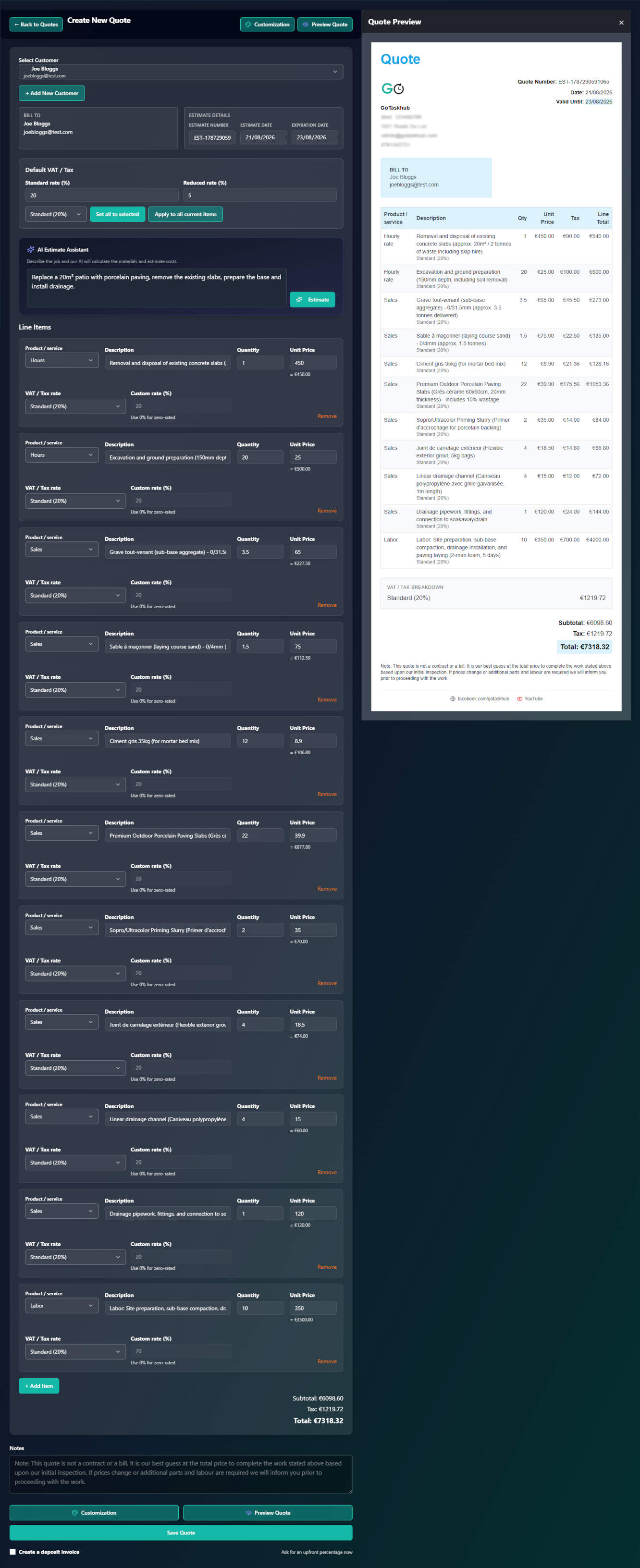
GoTaskHub AI Quoting screen showing automated line items, local pricing, and client approval

Highlights

A quick snapshot of what you can do.

AI Estimator

Turn plain-text job descriptions into complete itemised quotes in seconds.

Accurate Math

Automatic quantities, per-line tax rates, and subtotal discounts.

Scope Control

Attach photos, terms, and specifications with full revision tracking.

How it works

Simple steps to get powerful results.

1
1

Describe the Job

Type the project requirements into GoTaskHub in your own words.

2
2

AI Estimates Pricing

AI calculates material quantities, local trade prices, and required labour.

3
3

Review & Customise

Adjust line items, apply your branding, and set validity terms.

4
4

Send for Approval

Share a secure link with the customer for one-tap digital acceptance.

5
5

Convert to Invoice

Turn the approved quote into a scheduled job and final invoice with one click.

Key Benefits

What you get out of this feature - fast.

Instant AI Estimating

  • Describe jobs in plain English
  • Automatic material & labour breakdown
  • Local trade pricing research

Professional Presentation

  • Custom logo & branding
  • Saved quote templates
  • Itemised line items & taxes

Fast Client Approvals

  • Share via secure link or email
  • Mobile-friendly customer preview
  • Timestamped digital approval

Connected Workflow

  • 1-click convert to invoice
  • Schedule approved jobs in calendar
  • Zero manual re-typing

Scope Protection

  • Attach site photos & specs
  • Explicit inclusions & exclusions
  • Audit trail of all edits

Export & Reporting

  • Download branded PDFs
  • Export CSV data
  • Track quote win rate over time
Instant AI Quoting

From a rough job description to a finished quote in minutes

Stop spending your evenings measuring spreadsheets and hunting supplier websites. Describe what needs doing in plain English, and let GoTaskHub do the math.

1. Describe the job in your own words

"Replace 20m² patio with porcelain paving, excavate 150mm, lay MOT Type 1 sub-base, full mortar bed, and install 4m drainage channel."

GoTaskHub AI Estimator
Researching local porcelain, aggregate, and cement prices
Calculating excavation volumes and waste removal skip requirements
Estimating groundwork and paving labour hours
Draft Quote #Q-104820m² Porcelain Patio Installation
Ready for Review
Item DescriptionQtyPrice
Site excavation (150mm depth) and 6-yard grab lorry disposal20 m²£360.00
MOT Type 1 sub-base aggregate supplied and compacted3.5 tonnes£165.00
Full wet mortar bed, priming slurry, and 4m linear drainage channel1 pkg£220.00
Contemporary 600x600 outdoor porcelain paving slabs (plus 10% cut waste)22 m²£880.00
Skilled installation labour (ground preparation, laying, pointing)32 hrs£1,440.00
Total Quoted Price£3,065.00
Try AI Quoting Free →

Current Local Pricing

AI factors in realistic regional material rates and trade costs, so you never quote with outdated supplier assumptions.

Waste & Consumables Included

Automatically builds in 10-15% cut-waste allowances and essential fixings, preventing accidental underquoting.

You Stay in Full Control

AI produces the first draft. You review, tweak rates, apply custom terms, and approve every line before it reaches the client.

Everything you need to send a quote you are proud of

Whether you build quotes with AI or assemble them from your saved templates, GoTaskHub gives your trade business a polished, professional edge.

Branded Templates

Add your logo, company colours, contact details, and saved terms. Start from a standard template instead of reinventing the wheel.

Accurate Calculations

Per-line tax rates, optional upsell items, and subtotal discounts calculated automatically. No math errors in front of clients.

Visual Attachments

Attach site photos, drawings, manufacturer spec sheets, and warranty notes directly to the quote to prevent scope creep.

1-Click Digital Approval

Send a secure share link. Customers review and accept on their phone with one tap, giving you a timestamped audit trail.

Connected Trade Operations

A quote shouldn't end with a PDF

GoTaskHub connects your quoting engine directly into your operations. No re-typing details into separate scheduling apps or accounting software.

1. AI Quote Created
→
2. Client Approves Online
→
3. Scheduled Active Job
→
4. 1-Click Invoice
→
5. Payment Collected

Zero Re-typing

Approved line items and customer data automatically populate your active job card and invoice.

No Billing Leakage

Every agreed fixture, material cost, and variation hours is carried straight to billing without omissions.

Full Client Transparency

Clients can view their quote history, approvals, and invoices in their own branded online portal.

How to quote a price for a job (step-by-step)

A successful quote balances accurate cost calculations with crystal-clear scope. Use this step-by-step framework to price work with confidence:

Step 1

Define Clear Scope

List specific tasks, materials, and explicit exclusions (such as making good or redecorating) to prevent scope creep.

Step 2

Material Take-Off

Include trade prices, delivery charges, and a 10-15% buffer for cutting waste and consumables.

Step 3

Realistic Labour Time

Calculate on-site hours, travel time, site setup, and cleanup using your true hourly recovery rate.

Step 4

Overheads & Profit

Add your proportionate business overhead allowance and planned net profit margin (typically 15-25%).

Step 5

Set Terms & Deposit

Include quote validity windows (14-30 days), start dates, and upfront deposit requirements.

Step 6

Digital Delivery

Deliver an itemised proposal with a 1-click approval button to lock in the job quickly.

Need an in-depth breakdown on calculating hourly rates, overheads, and markup? Read our comprehensive guide: How to Quote a Job: A Complete Guide to Pricing Work Profitably.

Frequently asked questions

Quick answers to common questions.

Q.How does the AI Estimator calculate quote prices?
You describe the work in plain English (e.g. 'Replace a 20m² patio with porcelain slabs, including excavation and base'). GoTaskHub analyzes the scope, calculates material quantities, applies current trade prices and local labour rates, and generates an itemised draft quote in seconds.
Q.Can I edit the AI-generated quote before sending it?
Yes, always. You remain in complete control. The AI does the heavy initial research and math, and you can add, remove, or adjust any line items, hourly rates, markups, or terms before the quote reaches your customer.
Q.How do customers approve quotes online?
You send a secure digital link via email or SMS. Customers can view a clean, mobile-responsive proposal and approve it with one click. You receive an instant notification with a timestamped audit trail.
Q.Can I convert an approved quote into an invoice automatically?
Yes. With one click, all approved line items, descriptions, quantities, and agreed totals carry directly into an active job and onto your final invoice without any manual data entry.
Q.Can I save reusable quote templates for common services?
Yes. You can build a library of standard services, pre-priced packages, and custom terms so your team can build consistent proposals in seconds.
Q.Can I attach photos and specification sheets to quotes?
Yes. You can attach site photos, manufacturer spec sheets, wiring diagrams, and warranty documents directly to the quote so clients have complete clarity.

Ready to streamline your business?

Join thousands of trade professionals who are saving time and winning more work.

No credit card required.

Cookies & analytics

We use necessary cookies to make GoTaskhub work, and optional analytics cookies to understand how the site is used so we can improve it. You can change your choice at any time.

Necessary cookies

Always on – required for things like security and basic functionality.