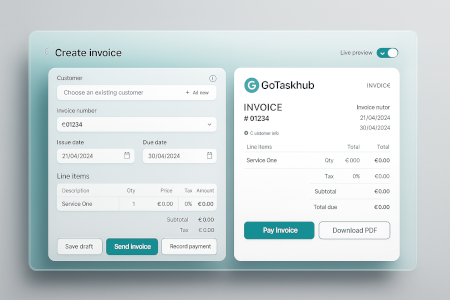
Invoicing software that helps you get paid faster
GoTaskhub Invoices is designed for trades and service businesses who want fast, accurate billing. Create invoices from scratch or convert from quotes or jobs, apply tax, discounts, and payment terms, then send by email or share a secure link. Track partial payments and outstanding balances, and follow up on overdue invoices with a simple workflow.
What is invoicing in GoTaskhub?
Invoicing turns completed work into clear, professional bills with accurate totals and terms. GoTaskhub keeps all the context-line items, taxes, discounts, and job details-so you can send faster and get paid sooner without re-typing.
Why invoice clarity matters
Confusing invoices slow down payments. Clear line items, due dates, and terms reduce customer questions and help invoices get approved faster-especially for trade jobs where scope can change on-site.
How GoTaskhub invoicing works
Create or convert
Build an invoice from scratch or convert an approved quote / completed job to avoid re-typing line items and customer details.
Add tax, discounts, and terms
Apply tax and discounts, add payment terms (due on receipt, Net 7/14/30), and keep totals consistent and accurate.
Send by email or link
Send invoices quickly and share a customer-friendly link so clients can view the details without confusion.
Record payments and balances
Log partial/full payments and keep remaining balances visible. This is ideal for deposits, staged work, and progress billing.
A simple weekly receivables routine
Set aside one time slot per week to check unpaid invoices, send polite reminders, and record any bank transfer payments. Consistent follow-up tends to improve payment timeframes without needing aggressive chasing.
Who invoicing is for
Whether you’re a solo tradesperson or a small team, GoTaskhub helps standardize billing so invoices are consistent and easy to reconcile.
Owner / Manager
See what’s unpaid at a glance. Standardize branding and stay on top of cashflow with simple reminders.
Office / Admin
Convert from quotes or jobs, send PDFs, log payments, and reconcile faster-no duplicate data entry.
Field Team
Capture proof on-site and hand off cleanly so invoices are complete and ready to send the same day.
Common invoicing use cases
Built for real-world trade workflows: deposits, staged payments, and billing right after a job is completed.
Job completion billing
Convert a finished job into an invoice in one click so details and scope carry through correctly.
Deposit + balance invoices
Record a deposit upfront and log the final payment on completion-perfect for larger projects.
Progress billing
Split larger projects into staged invoices while keeping all context and totals consistent.
Field billing
Send invoices from your phone after a site visit so customers receive it while the job is fresh.
Spreadsheets vs word processors vs GoTaskhub invoicing
Spreadsheets are flexible but error-prone. Word processors can look fine but don’t total reliably or track payments. GoTaskhub generates branded invoices with accurate totals, clear balances, and a simple process for reminders-so cashflow stays healthy.
| Capability | GoTaskhub | Spreadsheets / Word docs |
|---|---|---|
| Accurate totals | Automatic tax/discount totals | Manual formulas / mistakes |
| Deposit & partial payments | Record partials, track balance | Manual notes / no balance tracking |
| Convert from quote/job | One click conversion | Copy/paste + re-typing |
| Overdue tracking | Saved overdue views + workflow | Hard to keep updated |
| Brand consistency | Logo + colors + templates | Varies per document |
| Export + records | PDF export for audit trail | Scattered files |
Pros & cons of GoTaskhub invoicing
Pros
- Branded, professional invoices clients understand
- Accurate totals with tax and discounts
- Deposit + partial payments with remaining balance tracking
- Overdue visibility with a simple reminder workflow
- Convert from quotes/jobs to reduce admin time
Cons (and mitigations)
- Late follow-up → check overdue view weekly
- Brand inconsistency → standardize templates
- Manual re-typing → convert from quotes/jobs
- Missing proof → attach files/photos via jobs
Common invoicing mistakes (and fixes)
- Unclear terms: add due dates and payment terms to reduce delays.
- Wrong totals: use structured line items with tax/discounts for reliable math.
- No deposit tracking: record deposits as partial payments tied to the invoice.
- No reminder process: use a saved overdue view to follow up consistently.
- Brand mismatch: apply a logo and colors so every invoice looks professional.
Security & privacy
Control who can create or edit invoices with role-based access. Keep an activity history for audits and export data when needed for reporting and compliance.
Permissions
Limit invoice editing to the right roles and reduce accidental changes-especially helpful when multiple people handle billing.
Records and exports
Export PDFs and CSVs to keep finance records organized and easy to reconcile with your accounting process.
Glossary
- Invoice
- A bill sent to a customer for goods/services provided.
- Partial payment
- A deposit or part of the total amount paid before completion.
- Payment terms
- Conditions such as due on receipt or Net 7/14/30.
- Overdue
- An invoice that has passed its due date and remains unpaid.
- Reminder
- A follow-up message sent to collect overdue balances.
- Conversion
- Creating an invoice from an approved quote or completed job.
Customer reviews
Bill clearly, follow up consistently, and get paid faster.

Emma R.
★★★★★
We invoice the same day now. Clear line items and terms cut back client questions, and payments are logged instantly.

Luca D.
★★★★★
Partial payments and deposits are simple. The branded PDFs look great and help us get paid faster.

Sofia M.
★★★★★
Reminders + saved views keep overdue balances visible. Cashflow is healthier because follow-up is automatic.
Next: send quotes first, then invoice instantly
Create quotes, get approval, convert to invoices, and keep the workflow consistent from lead to payment.